QR Code Tracking & Scan Analytics
Stop guessing which placement works. Every scan, logged and charted.
A printed QR code without tracking is a leaflet dropped from a plane - you'll never know if anyone picked it up. A trackable QR code routes each scan through a redirect that logs the moment before forwarding, so you see scans per day, device split, and where in the world they happened. Put different codes on the poster, the receipt, and the packaging, and you'll know within a week which surface earns its ink. Tracking is built into every QRmkr dynamic code - it's not an add-on tier.
What QR code tracking looks like
Every dynamic code gets its own dashboard. No setup, no tracking pixel, no analytics account to connect - the redirect logs the scan before it forwards.
Dashboard views below; scan numbers are illustrative.
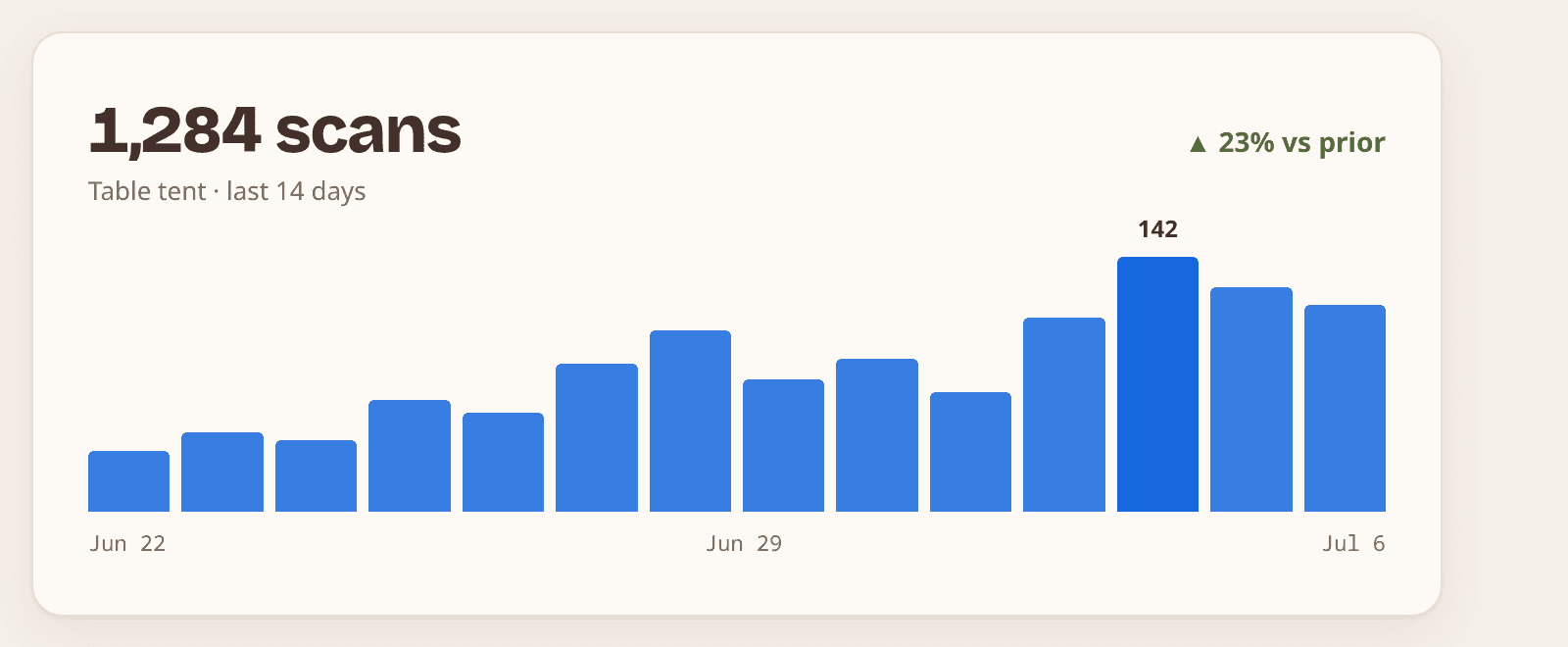
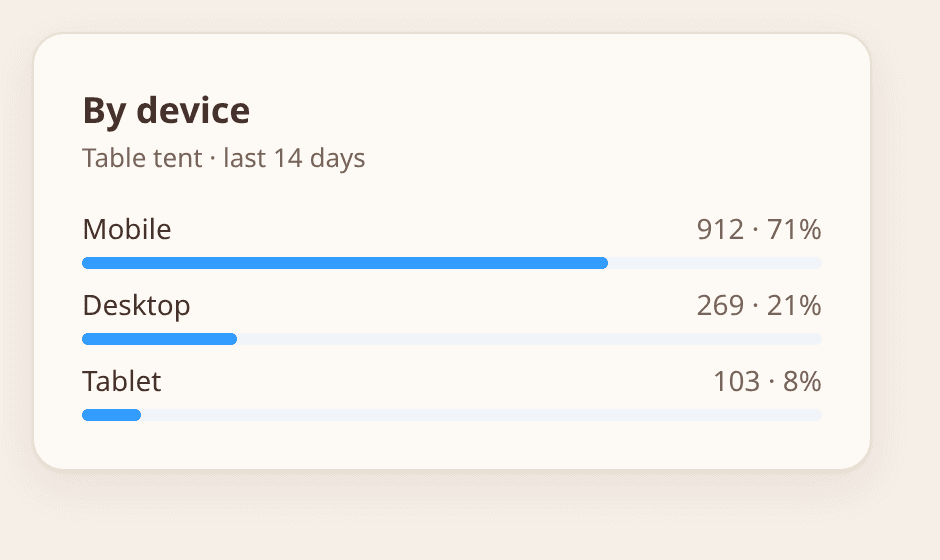
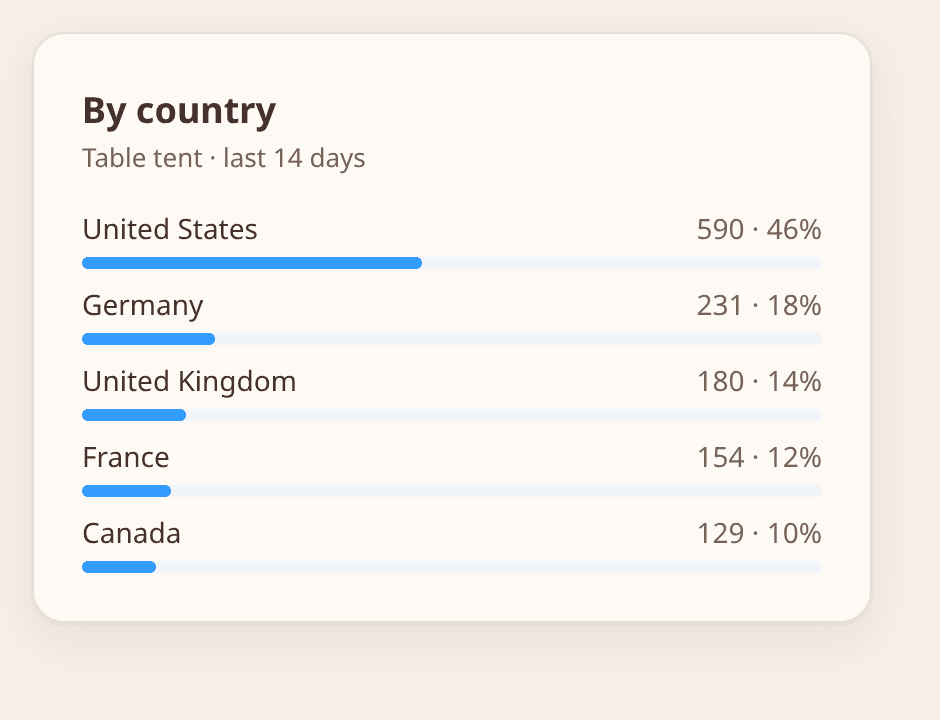
How do I track QR code scans?
You track scans by using a dynamic QR code. Instead of encoding your destination directly, a dynamic code encodes a short redirect you own. When someone scans it, their phone hits that redirect first: the scan is recorded - timestamp, device class and OS, browser, and coarse location - and the phone is forwarded to your destination in the same breath. The person scanning notices nothing; the whole hop takes milliseconds.
- 1
Create a dynamic QR code and point it at your destination. Tracking is on by default - there is nothing to enable.
- 2
Print or publish the code. Use a separate code per surface (poster, receipt, packaging) if you want to compare them.
- 3
Open the code's dashboard: scans by day, device split, and location, updating as scans arrive.
- 4
Export the raw scan log as CSV when you need it in a spreadsheet or BI tool.
A static QR code cannot be tracked at all: the destination is baked into the pattern, so the phone goes straight there and nothing observes the trip. That is the whole reason tracking and editable dynamic QR codes come as a pair.
QR code analytics: what the numbers tell you
Scan analytics answer questions print marketing has always had to guess at. A few readings that come up constantly:
Which placement earns its ink
One code per surface turns “the flyers seemed to work” into a number. Kill the surface that scores 12 scans and reprint the one that scores 400.
When your audience actually scans
Time-of-day and day-of-week patterns tell you when to swap the destination - lunch menu in the morning, dinner menu at 4pm, on the same printed code.
Whether the campaign is still alive
Scans decay predictably. When a code flatlines, the poster is stale, gone, or blocked - and you find out in the dashboard instead of at the next quarterly.
Where to spend the next print run
Country and city breakdowns show which regions responded, so the next batch goes where the scans already are.
Privacy note: scans are stored with a salted hash rather than a raw IP address, so you get placement analytics without holding personal data.
What you get
Time, device & location per scan
Every scan records when it happened, phone OS and device class, and country/city - charted live in your dashboard.
Compare placements with per-surface codes
One code per poster, shelf, or table lets you A/B physical placements the way you'd A/B a landing page.
CSV export
Pull the raw scan log into Excel, Sheets, or your BI tool for reporting that survives the marketing meeting.
How it works
- 1
Create a dynamic QR code - tracking is on automatically, nothing to configure.
- 2
Place it (or several, one per surface) in the real world.
- 3
Open the dashboard to watch scans by day, device, and location; export CSV anytime.
FAQ
Can you track a normal (static) QR code?
No. A static code sends the phone straight to the destination with no measurable step in between. Tracking requires a dynamic code that routes through a logging redirect first - which also makes the code editable, as a bonus.
What data does QR code tracking collect?
Scan timestamp, device class and OS, browser, and coarse location (country/city). We store a salted hash instead of raw IP addresses - you get placement analytics without holding personal data.
Do scanners need an app for tracked codes?
No. Tracking happens server-side during the redirect; the person scanning just sees your page open in their camera app like any other code.
Is scan tracking free?
Tracking comes with dynamic codes, which are part of Pro at $12/month - flat, with unlimited codes and no per-scan fees.
Looking for a trackable QR code generator?
You're in the right place - every dynamic code QRmkr creates is a trackable QR code out of the box. There's no separate tracking product to bolt on: if you want a QR code generator with analytics built in rather than sold as an add-on, create a dynamic code and the dashboard starts charting scans by day, device, and location from the very first scan.
Create your first code in under a minute
Free to start, no card required. Static QR codes are free forever.
Get started free